Thursday, June 9, 2011

Thursday, June 9, 2011: Random Factor Mahjong

Today's app is Random Factor Mahjong.
From what I've played of it, it's really awesome. It's definitely the best Mahjong app in the market. And for that, I give it a 5 out of 5.


PS. So, I never got around to reviewing yesterday's app, which was about salsa dancing, and for that I apologize.  And as far as this review goes, it's really short, but I haven't been home long enough to give it a proper review. I'll do it when I get home though. I definitely suggest downloading it if you can, though.

Tuesday, June 7, 2011

Tuesday, June 7th, 2011: Car Maintenance Reminder Pro

Today's free app is Car Maintenance Reminder Pro, brought to us by cooloy.com.

Amazon describes it by saying: "Car Maintenance Reminder Pro helps you to track the service records of your cars, including oil change, tire rotation, change of engine or cabin air filter, and annual state inspection. Using this app's intuitive system of statistics and reminders, you can significantly improve the reliability and performance of your car."


As you can see, you are presented with a TON of fields in which you put information about your car, such as your last inspection, mileage, last oil change, etc.  The goal is for you to update your mileage every time you drive your car, and to let it know how much gas you bought.  The whole purpose is just so that you can keep track of when you need to have stuff done to your car.

Now, this isn't really useful at all to me, since I don't own a car.  I can definitely see how it would be more useful to people who are really meticulous with their car care, but again, it doesn't apply to me.

And for that, I give Car Maintenance Reminder Pro a 3 out of 5.
You might find much more use for this app, but I'm not someone who will.  Come back tomorrow for the next review!

Monday, June 6, 2011

Special Review! "Plants vs. Zombies"

Hello everyone.  When I first started this blog, oh so long ago (yesterday), I said that I was likely going to be reviewing non-daily apps every once in a while.  These may be apps that were daily apps before I made the blog, apps that are on sale, apps that I really like, or possibly even apps from which I am warning everyone to stay.

The extra-daily app that I'm going to be reviewing now is PopCap's "Plants vs. Zombies."  PvZ is, and has always been, my favorite PopCap game.  I bought it when it first came out on PC, and I'm been praying for an Android version ever since.  My wish came true early last week, when it was exclusively released for free through the Amazon Appstore.   Time to review!!


Above is the starting screen for my favorite game ever.  As you can see, it is a beautiful image of happy plants (minus the paranoid-looking nut at the corner) getting ready to battle a few zombies.  


After choosing a name for your account (you can have more than one, which is great if you share your phone), your only option is to choose Adventure (unless you count options, help, and achievements).  Quick Play is unlocked later.  After you choose adventure, you watch a short cutscene of a bunch of plants on a lawn fighting zombies.  It's a great preview of what is to come.


This is the battleground.  In the top left, there is a pea-shooter icon, and your current amount of sunlight (currency).  To play the game, you tap the seed packet, and place it on the ground where you want it.  Sunlight naturally falls from the sky (during the day.  There are nighttime levels), and you can get more using sunflowers.  


Forgiving the slight glitch in the screenshot (there is a delay in capturing), this is basically what it looks like during gameplay.  You need to create an army to keep the zombies from getting to your house.
After stopping the zombies from reaching your house, you win the level and unlock a new plant to use.

Between levels, you can choose which plants you want to use to fend off the zombies.


Now, I need to address the "Goods" and the "Bads" of the Android version of "Plants vs. Zombies."

Good

  • Provides excellent gameplay at a low cost.
  • Tons of levels to keep you playing for hours.
  • Achievement system (for those that require a pat on the back)
  • Beautiful graphics
  • Great soundtrack
Bad
  • Resolution was clearly ported from the iOS version.  This makes it horizontally stretched.
  • If the screen times out, it has to restart the app (this could be fixed with an update)
  • Must be downloaded over Wi-fi.

Now, all of the "bads" could easily be fixed with an update, and none of them are really a big deal.

For this reason, I have to give PopCap's "Plants vs. Zombies" a 5 out of 5.

Plants Vs. Zombies is by far the best game I've ever played on Android, and if you don't own it already, you need to buy it.  In fact, if you like it enough on Android, you should buy it on your computer, too.  Last I checked, the Game of the Year edition is only $10 on Steam, and it comes with multiple extra game modes.


5 out of 5

Monday, June 5, 2011: "Aporkalypse - Pigs of Doom"

Today's free app from the Appstore is titled "Aporkalypse - Pigs of Doom," and it is brought to us by "www.handy-games.com."
Amazon describes aporkalypse like this: "the world has a pig problem.  According to an old prophecy, the four Pigs of Doom should proclaim the end of the world in a distant future--but something went terribly wrong and the gates of Heaven and Hell have already opened.  Now it's up to the greedy Hunger Pig, the heavily armed War Pig, the controlling Pest Pig, and the ghostly Death Pig to stop this madness."

Now, that's a pretty "out there" description for a puzzle game involving pigs.  On to the review!

Aporkalypse is a top-down puzzle game, featuring the four "Pigs of Doom."  Each pig has their own special powers and abilities that help you solve the puzzles, in which the goal is to get all of the pigs to the end, and to collect as many coins as possible.


When you first load up the game, we're greeted with a welcoming start screen with five options: Start, Select Level, Help, More Games, and Facebook.  I won't go into detail of what the last three do, but if you click Start, it starts a new game, and if you click Select Level, you can choose to play any previously completed levels.

After selecting Start, a new game begins, with a conversation between an angel pig and a devil pig.  After some talking about the aporkalypse, you are brought into a level to play as Hunger Pig, who can carry enormous objects inside his mouth.
The controls are quite simple, with a Directional Pad for movement, and buttons along the side.  As I previously mentioned, each pig has its own abilities.  As Hunger Pig, when you approach a box, you are prompted to swallow it to carry it around.  The other pigs also have abilities that are quite useful to solving the puzzles.  War Pig, for example, can shoot cannonballs to destroy his enemies.


Overall, Aporkalypse - Pigs of Doom is a great puzzle game, with a great sense of humor.  The writing is done very well, the graphics are great, and the puzzles never stop being challenging.  If you have the bandwidth to spare, I definitely recommend that you give this one a download.  And if you like it enough, it's only $1.44 in the Android Market, so you could always support the developers by giving it a buy.


I give Aporkalypse - Pigs of Doom a 5 out of 5.

Sunday, June 5, 2011

Sunday, June 5, 2011: Turbo Grannies


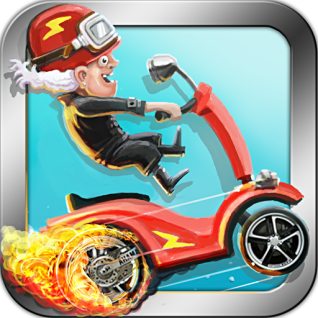
Today's free app is Turbo Grannies, brought to us by Imperial Game Studio AB.
Download Turbo Grannies

Turbo Granny is a sidescrolling driving game, with the goal being to stay on your wheels (and not on your head) until the end of each level, letting you move on to the next level.

Amazon describes it like this: 
"Turbo Grannies comes to your Android phone to bring you exactly what you'd expect in this aptly titled racing game--grannies on high-powered motorbikes.  This game possesses a great sense of humor, impressive graphics, and hilarious sounds.  Take on the challenge and try to keep your Turbo Granny from crashing as she races across diverse environments."

Upon starting the game, you are presented with four level choices:
After choosing your level, you get started into the game.  
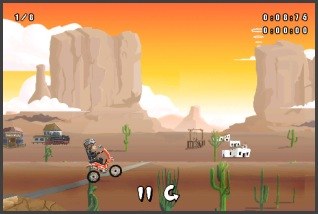
As you can see, the goal is to ride your scooter to the end of each level without crashing.
You hold the right side of the screen to accelerate, the left side to decelerate, and tilt controls to tilt back and forth.  

As far as a sidescrolling driving game goes, this one isn't one of my favorites.  The controls are a little rough, and the game is a little glitchy.  If you really like this kind of game and the challenge that comes with it, then it might be a good game for you.  It just isn't for me.

2 Stars out of 5

Source: Amazon.com

First Thing's First: Things You'll Need

Alright, so, I decided that I would make a list of things that are necessary to get the Appstore up and working.


  1. An Android Phone (Obviously)
  2. A carrier that supports the installation of non-market applications.  The Amazon Appstore isn't actually in the Android Market, so you need to be able to "sideload" Android Applications.
  3. An Amazon.com account.  No purchase is required to create an account, but they have some incredible deals, so I highly suggest you create one, even if you're not going to be using the Appstore.  
  4. An active data or wi-fi connection.  
Okay, so, to install the appstore on your phone, you need to go to this link.  On the top right side of the page, enter either your mobile number or email address in the box.  It should send you a link to download the application.  

If you need help installing it, click here. (Credit to Amazon for the link)


Okiedoke.  That should get you all set up.  Feel free to comment with any questions.

Saturday, June 4, 2011

Amazon Appstore Reviews

Hello everyone, and welcome to my new blog.
For the foreseeable future, my goal is to download every Amazon Appstore Daily free app and review it for you.
I know that a lot of you are on limited data plans, and you can't afford to download every free app on the market. Well, luckily for you, I'm on Verizon Wireless, and I can use as much data as I want.  So anyway, here's the general outline of how my posts are going to work:

The title will be the date, followed by the name of the app.
Next, I'll post an abridged version of the description provided by Amazon on their site.
Then, for the rest of the review, I'll post screenshots that I captured along the way, and describe how the app works.
At the end, I'll give it a rating out of five androids, and I'll post a link to the app on the Amazon Appstore.

I would like to mention, as I'll do this is in every review, that I'm going to be downloading every app at around 6am EST, and I'm planning to have every review up by 8am.  Now, this may make for some reviews that aren't completely informed, so, if I like the app enough, I'll keep using it and make a more thorough review by the end of the day.

Also, I may review some other Android Apps (Amazon exclusive or not) from time to time, especially if I didn't particularly like the Amazon app.

So, thanks for stopping by, and stay tuned!  The reviews start tomorrow!